$ continue from boot

I’m oriented. I read the repository instructions, current state, active queue
item, and bounded next step.

• Current task: finish the active work without expanding its scope.
• State: the latest checkpoint and recorded decisions are consistent.
• Next: implement the smallest authorized slice and run its recorded checks.
• Guardrail: do not reopen settled decisions or modify unrelated work.

I’ll continue with that slice, record the evidence, and leave a coherent
checkpoint for the next session.
FastImg is a local image renderer designed and optimized for one machine: my
2020 M1 MacBook Pro.
I began FastImg in August 2025, worked on it through September, and then left it
untouched for an unplanned nine months. When I returned in July 2026, I still
had the same laptop. The repository still contained the original
Claude-built web interface,
obligatory purple
included.
By current image-generation standards, the 2020 M1 was a modest target. I wanted
to find the practical throughput ceiling of hardware I already owned.
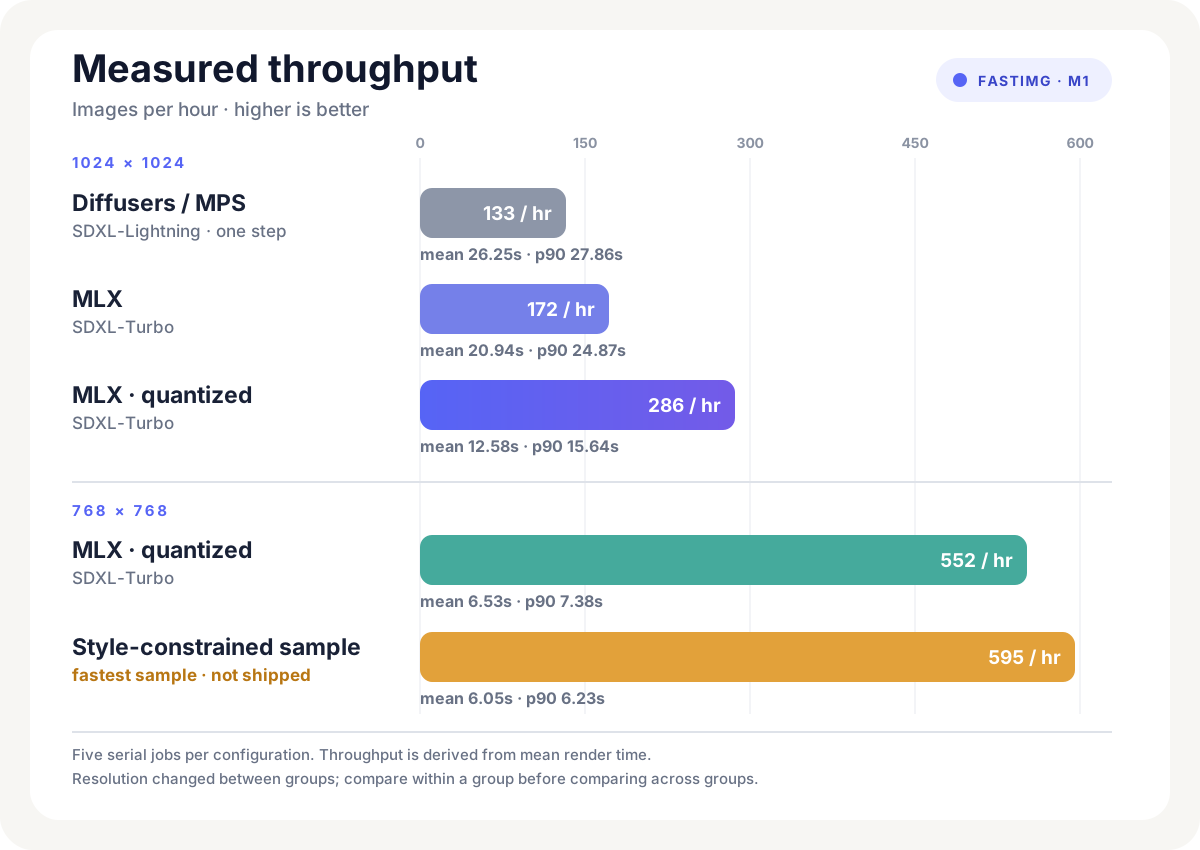
The first clean benchmark averaged 26.25 seconds per image, or about 133 images
an hour. The lowest mean in the later samples was 6.05 seconds, or about 595
images an hour.
This was not a general Apple Silicon benchmark. FastImg has one production
target. The machine is a MacBookPro17,1 with 16 GB of unified memory and an
8-core GPU. CPU fallback does not count. The goal is sustained local generation
on that machine.
The first clean baseline used the one-step variant of
SDXL-Lightning through
Hugging Face Diffusers and
PyTorch’s Metal Performance Shaders (MPS) backend
at 1024×1024. Later configurations used
MLX, Apple’s machine-learning framework for
Apple silicon, with SDXL-Turbo.
Each configuration below was measured with five serial jobs. Here, p50 is the
median render time, p90 is the time within which 90 percent of renders
completed, and quantized configurations store model weights at lower numerical
precision to reduce memory use.
The 768px results trade resolution for throughput and are not directly
comparable to the 1024px results. The unquantized and quantized 1024px MLX runs
both reported about 17.1 GB of peak overall allocation on a machine with 16 GB
of unified memory. The 768px run brought that down to about 11.3 GB.
The 512px result had a 4.16-second median and a 23.44-second p90, so I kept
768px.
MLX also had to be loaded and used on the same thread, otherwise it could fail
with:
There is no Stream(gpu, 0) in current thread.
FastImg now loads and renders through one dedicated worker thread. Jobs are
persisted to SQLite before they enter that queue.
Queued jobs resume in creation order after a restart; an interrupted processing
job is requeued once with the interruption recorded. Serialization also keeps
two render workloads from competing for the same 16 GB of memory.
Two hundredths of a second was not worth shipping
The quickest preset reached a 6.23-second p90, then lost all four side-by-side
quality comparisons. The preset I shipped reached 6.25 seconds, passed ten
quality reviews, and completed a 21-image run without failure.
A single field named current_model could not represent these outcomes. FastImg
tracked three separate facts:
Those values can point at the same configuration. They do not have to.
Recovering the experiment
Nine months later, the benchmark record offered several plausible wrong turns.
An obsolete local runtime made MPS look unavailable. A 512px run looked faster
until its 23.44-second p90 was considered. The quickest preset lost its quality
comparison.
None of those facts was false; each was incomplete. The evidence that changed
their meaning was split across benchmark artifacts, per-image metadata, human
votes, live server state, commit history, and prior chat. A fresh agent could
recover one result faithfully and still choose the wrong next experiment.
The production command fit in a README. The measurement history fit in a
benchmark journal, although the journal eventually became too large to read at
the start of every session. Neither gave a fresh session a compact answer to
three immediate questions.
The first version was START_HERE.md, one resume file containing runtime facts,
benchmark state, recent commits, and the next task. I soon split it into
BOOT.md for recovery, STATE.json for current truth, and NEXT.md for the
next bounded step, while the benchmark journal kept the detailed evidence.
Those files were committed to FastImg first. Less than twenty minutes later, I
generalized them into the first Agent Session Protocol Gist.
Continued use exposed another problem. A project’s durable priority can survive
many sessions; NEXT.md should describe only the next bounded step. I added a
queue to FastImg for the durable work and then carried that distinction back
into the Gist.
A queue is not a session
The result is five file roles, separated by how often they change and the
question they answer:
BOOT.md     How does a fresh session recover and work?
STATE.json  What is true now?
QUEUE       Which durable task owns attention?
NEXT.md     What bounded slice is authorized next?
TRACKER.md  What evidence and reasoning must survive?
For FastImg, the durable task might be “find the fastest acceptable local
renderer.” That task can survive many sessions.
One NEXT.md slice might be much narrower:
Benchmark quantized MLX SDXL-Turbo at 768px.
Use the fixed five-prompt set and seed 11.
Record mean, p50, p90, allocation, and failures.
Do not change the production default before human review.
When that slice finishes, the task remains active while NEXT.md advances to
the next evidence gap. The queue preserves strategic priority. NEXT.md
prevents that priority from becoming unlimited authority.
I later tested a four-step
FLUX.2 Klein
configuration. The candidate ran at a 43.76-second generation p90 and a
49.40-second total-wall p90. That was inside the predeclared sub-minute limit
for a slower quality configuration. All twelve candidate renders completed,
metadata passed, and peak MLX memory held at 4.83 GB.
Then I reviewed twelve exact pairs against the production renderer:
The candidate passed its relative comparison gate. I still wasn’t impressed by
the images.
“Usually better than the baseline” and “good enough to justify an
eightfold-slower quality configuration” are different questions. The experiment
stopped before confirmation and stability work, and production did not change.
If the next agent recovered only the 9-2-1 score, continuing the candidate would
look like the rational action. If it recovered only the rejection, the reason
would be lost and the benchmark could be repeated later. The evidence and the
decision both need to survive, along with the authority of the person or system
responsible for the gate.
The current protocol therefore keeps work status, evidence outcome, decision,
deployment state, and authority separate. Automated tests can own some gates.
Continuous integration (CI) or a deployment system can own others. Aesthetic
judgment remains human. Automated evidence does not satisfy a human-owned gate.
Making the convention executable
Markdown files alone eventually drift, so the protocol includes a local
JSON Schema and a validator. The validator can check
things such as:
the queue’s active task, STATE.json, and NEXT.md all naming the same task;
the active slice identity agreeing between state and next;
referenced task, evidence, and workspace files existing;
required acceptance checks and scope fences being present;
recorded clean-worktree requirements matching reality;
state and next staying inside their context budgets.
It cannot prove that a benchmark is honest or that a product decision is good.
It can keep a fresh session from starting with three conflicting versions of
the current task.
Detailed output does not get copied into STATE.json. State retains a compact
evidence reference: a run id, command, path, commit, timestamp, and short result.
The benchmark journal or generated artifact remains canonical. When working
context grows too large, old detail moves out and the reference stays behind.
The same rule applies across repositories. Each workspace records its role,
branch or commit when relevant, dirty-tree policy, and verification commands.
A clean primary repository is not a coherent checkpoint if a required sibling
contains an unexplained partial implementation.
At shutdown, the agent updates only the files whose truth changed, validates
the protocol, and commits one coherent checkpoint.
Continue from boot
A fresh session starts with:
> continue from boot
The agent reads the repository instructions and BOOT.md, runs the validator,
loads current state, reads the active queue item and bounded next slice, checks
the recorded workspaces, and opens the tracker only when it needs historical
evidence.
There is no continuity service. The files are ordinary Git artifacts and the
protocol is agent-agnostic. It has been pressure-tested primarily by this one
project, so I do not yet know whether these are the correct abstractions for
every long-running agent task. Five canonical files may still be too many.
Compaction still requires judgment. A validator catches structural drift, not
stale truth.
In FastImg, continue from boot now names a reproducible recovery procedure. A
fresh session can distinguish “this was fastest” from “this was approved,”
recover the exact Python runtime that makes the GPU work, avoid re-running the
512px tail-latency mistake, and continue the current experiment without being
given the previous conversation.
The Agent Session Protocol is
the public overview. Its source Gist
contains the current specification, schema, validator, templates, and setup
prompt.
I’ve spent the last several years building a Kubernetes development platform used daily by upwards of 100 engineers. Before that, I built an operator, a cluster portal, and helped migrate a monolithic server into containers. I’ve seen what K8s looks like in production.
I also know what it feels like when you read the docs for the first time and nothing sticks. Pod. ReplicaSet. Deployment. StatefulSet. The docs tell you what each one is, but they read like a glossary. You memorize it, close the tab, and forget everything by Monday. My eyes glazed over and stayed that way for a while.
It took me a long time to internalize any of it. Every concept in Kubernetes exists because someone hit a real operational problem and needed a reusable answer. But until you hit that problem yourself, YAGNI. So let’s build something and see what breaks.
The app
You build a small Go service for your team. It’s a simple event collector. Other services POST events to it, and you can GET recent events back. A few endpoints, an in-memory slice, nothing fancy.
packagemainimport("encoding/json""net/http""sync""time")typeEventstruct{Sourcestring`json:"source"`Actionstring`json:"action"`Timetime.Time`json:"time"`}// Store everything in memory. What could go wrong?var(events[]Eventmusync.Mutex)funcmain(){http.HandleFunc("/events",func(whttp.ResponseWriter,r*http.Request){mu.Lock()defermu.Unlock()switchr.Method{case"POST":vareEventiferr:=json.NewDecoder(r.Body).Decode(&e);err!=nil{http.Error(w,err.Error(),http.StatusBadRequest)return}e.Time=time.Now()events=append(events,e)w.WriteHeader(http.StatusCreated)case"GET":json.NewEncoder(w).Encode(events)default:http.Error(w,"Method not allowed",http.StatusMethodNotAllowed)}})http.ListenAndServe(":8080",nil)}
You build the binary. You run it on a server. Your team starts sending events to it. It works. Life is good.
It crashes at 2am
The in-memory slice just grows. Every event appended, never evicted. After a few weeks, the process eats enough memory that the OS kills it. Nobody notices until morning. All the events are gone.
Swap the in-memory slice for SQLite. Now events survive restarts. But the process is still dying and still needs to be restarted.
You write a systemd unit with a restart policy. You add a health check. It works. This was just how you ran services: systemd, cron, maybe a shell script that checked a PID file. The industry ran on this stuff for a long time, and for one service on one machine it can still be perfectly reasonable.
Containers
The systemd setup keeps it running. But now you’re iterating on the app. You fixed the OOM issue. You want filtering and a retention policy. Every change means rebuilding, copying a binary, restarting the service, and hoping the machine still looks like the machine you tested on.
A container image packages the application and its runtime filesystem into one artifact. Build it once, ship that same image to another machine, and you remove a whole category of “works on my server” problems.
Run it with docker run --restart=unless-stopped. If the process exits, Docker starts the container again. Deploying to a new server is mostly docker pull and docker run. Same image, same entrypoint, fewer mystery dependencies.
Life is good again. But it’s still one process on one machine.
It grows up
Your event collector needs a real database now. You add Postgres. You add Redis for caching recent events. Now you have three things to run, configure, connect, and restart in the right order. Running docker run three times with the right networks, volumes, environment variables, and port mappings gets old fast.
Docker Compose handles this cleanly. One YAML file, all three services, one command to bring them up.
docker compose up and everything starts together. This is genuinely great for development and small deployments. A lot of systems never need more than this.
But Compose still has one view of one machine. Your problem is about to become a fleet problem.
It gets popular
Another team hears about your event collector and starts sending deploy webhooks to it. Then QA hooks it up to their test runner. Traffic doubles. Response times go up. The single machine can’t keep up.
So you SSH into a second server. Pull the images. Run the containers. Put a load balancer in front of both. Traffic splits. Things speed up.
Then you add a third server for redundancy. Now you’re checking whether each machine is alive, updating containers one at a time, and repairing the load balancer when an address changes. You write a script. The script gets bigger. A deploy fails halfway through and leaves different versions running on different machines. You discover that your rollback script is mostly a comment that says TODO.
This is the moment Kubernetes starts to make sense. Not because containers suddenly became complicated, but because the live system has behavior you can no longer keep in your head. You need somewhere to record what should be running, somewhere to record what is actually running, and software that keeps comparing the two.
What Kubernetes actually is
You now have three machines running your application. In Kubernetes, each machine is called a node. Install it across all three, and you now have a cluster.
One machine runs the control plane: the API server, scheduler, and controllers. We’ll come back to each of these pieces shortly.
The other two are worker nodes. Each worker runs a small agent called the kubelet, which manages containers on that machine.
Instead of connecting to each worker node and starting containers yourself, you use the API server to tell the cluster which containers should be running. Kubernetes stores that request as a resource.
The smallest resource you can create to run those containers is called a Pod. When you create a Pod, the scheduler looks at the Pod’s requirements, finds a worker node with room for it, and assigns the Pod to that node.
The kubelet on that node sees the assignment, starts the requested containers, and reports what happened back to Kubernetes.
Each resource type is paired with specialized code called a controller. The resource describes what you want, and the controller knows what actions to take to make it happen.
A controller watches the resources it understands. It reads what you asked for in the resource’s spec, checks what currently exists, and makes changes to close the gap. It then updates the resource’s status with a snapshot of what it observed so people and other parts of Kubernetes can see it.
Think of a thermostat. You set a desired temperature. The thermostat observes the room and turns equipment on or off. A controller follows the same pattern: observe, compare, act, and repeat.
The Pod
A Pod can contain multiple tightly coupled containers, but most application Pods have one main container, so we’ll start there.
Apply it with kubectl apply -f pod.yaml. The API server accepts the object. The scheduler finds an eligible node and binds the Pod to it. The kubelet on that node sees the assignment, asks the container runtime to pull the image, and keeps the Pod’s containers aligned with the Pod spec.
If the collector process exits, the kubelet restarts that container according to the Pod’s restart policy. The Pod was not rescheduled and a controller did not create a new Pod. The same kubelet repaired the containers inside the same Pod.
That distinction sounds pedantic until the whole node disappears.
The server dies
Your collector is running on node-2. Then node-2 loses power. The kubelet is gone with it, so there is nobody on that node to restart the container.
The control plane eventually marks the node unhealthy and the Pod for deletion. But this is a bare Pod. Nothing owns it. Kubernetes knows that a Pod existed; it has no higher-level instruction saying another one must exist somewhere else.
Pods are scheduled once in their lifetime. A dead Pod is not picked up and moved to another node. To get replacement behavior, you need an object whose desired state is larger than one named Pod.
ReplicaSets: “I want three of these, always”
A ReplicaSet is paired with a controller that understands ReplicaSets. The resource contains a Pod template and a replica count. If it asks for three Pods and only two exist, the controller creates another Pod.
The new Pod becomes a request for the rest of Kubernetes. The scheduler chooses a node for it, and that node’s kubelet starts its container. Each part does one job.
Now desired replicas is 3 and actual replicas is 3. If a Pod disappears with a failed node, the ReplicaSet creates a replacement. No SSH. No server list in a shell script.
Three replicas do not automatically mean three different nodes. The scheduler considers resources and its configured policies, but it is allowed to place multiple replicas together. When failure-domain spread matters, you add topology spread constraints or pod anti-affinity. Kubernetes makes placement controllable; it does not infer every availability requirement you forgot to state.
Pushing a new version
Your collector has a bug. Events with empty sources are being stored instead of rejected. You fix it, build collector:v2, and push the image.
Now what? You have three Pods running v1. A ReplicaSet knows how to maintain a count, not how to conduct a release. Changing its Pod template does not rewrite the Pods it already owns. Existing Pods keep running v1; only Pods created later use v2.
You could delete Pods one at a time and wait for replacements. You could create a second ReplicaSet, scale it up, and scale the first one down. You could write a script that coordinates both and stops when the new version is broken.
You have just discovered another behavior worth giving to a controller.
Deployments: controlled rollouts
A Deployment owns ReplicaSets and adds release history and rollout strategy. When its Pod template changes, the Deployment creates a new ReplicaSet for the new version, gradually scales it up, and scales old ReplicaSets down.
With this strategy, the Deployment may run one extra Pod during the rollout and does not intentionally reduce the available count below three. That is more precise than saying a rolling update always keeps exactly three Pods or always guarantees zero downtime. Availability depends on the rollout settings, spare capacity, and whether Kubernetes can tell when the application is actually ready. We’ll fix that last part shortly.
kubectl rollout status deployment/collector watches progress. If v2 is worse than the bug it fixed, kubectl rollout undo deployment/collector restores the previous Pod template, provided that revision is still in the Deployment’s retained history.
This is why you rarely create ReplicaSets directly. You create a Deployment. The Deployment manages ReplicaSets. ReplicaSets manage Pods. The scheduler binds Pods to nodes. Kubelets run their containers. Controllers all the way down would be a catchy phrase, but not quite accurate: some of these pieces are controllers, and some are specialized control-plane or node agents.
Services: finding your Pods
You have three Pods, but each has its own IP address. Those IPs change as Pods are replaced. Clients should not have to watch the cluster and maintain their own backend list.
A Service gives the workload a stable name and virtual address. Its selector defines which Pods are eligible backends.
Anything in the same namespace can reach http://collector. From another namespace, the short cross-namespace name is collector.production; the full cluster DNS name is usually collector.production.svc.cluster.local.
The Service itself is not secretly scanning packets for labels. The EndpointSlice controller watches Services and Pods and writes EndpointSlice objects containing the current backend addresses. Readiness affects which endpoints are usable. A service proxy or networking implementation watches the Service and EndpointSlices and programs the data plane.
This is a good example of Kubernetes layering. You declare a durable relationship with a selector. Controllers turn that relationship into current endpoint data. Another component turns that data into routing. Pods come and go; clients keep using the same Service name.
The state problem: StatefulSets
Everything so far assumes replicas are interchangeable. Kill one, replace it, nobody should care which replica came back.
Some workloads do care. A distributed system may need stable member names. Each replica may need its own disk, and replica zero must come back attached to replica zero’s data. A Deployment can mount persistent storage, but it does not provide a stable one-to-one identity between an ordinal replica and its volume.
A StatefulSet does. Each Pod gets a stable ordinal name such as mystore-0, mystore-1, and mystore-2. A headless Service gives those members stable DNS identities, and a volume claim template creates a distinct persistent volume claim for each ordinal.
If mystore-0 is replaced on another node, the replacement is still mystore-0 and is associated with the same claim. By default, StatefulSets also create and update Pods in ordinal order, although that behavior can be changed with the pod management policy.
StatefulSet is a building block, not a database operations team in YAML. It does not invent replication, backups, failover, consistency, or safe upgrades for your software. If all you need is Postgres, a managed database outside the cluster is often simpler. If you do run a database in Kubernetes, an operator can encode database-specific operational knowledge and use StatefulSets, Services, Secrets, and volumes underneath.
That operator pattern is Kubernetes at its most interesting. You create a higher-level resource such as a Postgres cluster. The operator observes both Kubernetes objects and the live database, updates status with what it learned, and acts until the database matches the declared intent. The resource type exists because the controller needs a durable vocabulary for behavior Kubernetes does not understand on its own.
Namespaces: giving names a scope
Your cluster now has your app, a database, a monitoring stack, and whatever another team deployed. Everything is in default, names collide, and nobody knows who owns what.
Namespaces scope namespaced resources. They let collector exist independently in production and staging, and they provide a place to attach quotas and access policies.
kubectl create namespace production
kubectl create namespace staging

kubectl apply -f deployment.yaml -n production
kubectl apply -f deployment.yaml -n staging
Namespaces are often described as folders, which is useful until it isn’t. They are API scopes, not hard security boundaries. Pods in different namespaces may still communicate unless NetworkPolicies and the network implementation enforce restrictions. RBAC controls who can do what. ResourceQuota and LimitRange control consumption. Admission policy controls what may be created.
A namespace gives those policies somewhere coherent to apply. It does not provide isolation merely by existing.
Gateway API: letting the outside world in
Your Service is reachable inside the cluster. The quickest external path on many cloud clusters is a Service with type: LoadBalancer, but creating one for every HTTP service gives you a growing collection of public addresses, DNS records, certificates, and cloud load balancers.
What you want is a shared front door that routes by hostname or path. Ingress has filled that role for years. Gateway API is its successor and models the infrastructure and application routing as separate resources.
Gateway API is not implemented by the core Kubernetes binaries. You install its CRDs and a compatible implementation, and that implementation normally provides one or more GatewayClasses. Suppose the platform exposes a class named internet.
The platform team creates a Gateway in gateway-system and allows Routes from application namespaces to attach:
collector.example.com now routes to the collector Service in the Route’s namespace. Another team can attach a different HTTPRoute to the same Gateway without editing the collector’s file.
The clean part is ownership. The platform team owns the GatewayClass and Gateway: how traffic enters the cluster. Application teams own HTTPRoutes: where their traffic goes. The implementation’s controller reconciles those resources into whatever load balancer, proxy, or cloud infrastructure actually carries the traffic.
ConfigMaps and Secrets: configuration outside the image
Different environments need different database addresses, feature flags, and credentials. Rebuilding the application image to change a log level defeats the point of having one immutable artifact.
Secrets hold values Kubernetes intends to treat as sensitive. This example uses a fake password for illustration; committing a real Secret manifest to Git is still committing the secret.
The values in a Secret object’s data field are base64-encoded. Base64 is not encryption. In a self-managed cluster, Secret data is stored unencrypted in etcd unless encryption at rest is configured. RBAC, encryption at rest, audit controls, and careful distribution are what protect the value.
Teams often integrate a cloud secrets manager or Vault. One pattern synchronizes external values into Kubernetes Secrets. Another mounts values through a CSI provider without creating a long-lived Secret object. The right choice depends on the threat model, but an external source does not magically make an ordinary Kubernetes Secret harmless once the value has been copied into it.
ConfigMaps and Secrets can be exposed as files or environment variables:
Your image and configuration now have separate lifecycles. That is the important part.
Startup, readiness, and liveness: what the kubelet can observe
Kubernetes knows whether a process exists. It does not automatically know whether the process has finished starting, can serve a request, or is deadlocked while still technically running.
Probes let the kubelet ask those questions explicitly:
A startup probe gives a slow-starting application time to initialize before liveness checks begin. A failed readiness probe marks the Pod unready; the EndpointSlice controller removes it from the ready backends used by matching Services. The container keeps running.
A repeatedly failed liveness probe tells the kubelet to restart that container in the same Pod. It does not delete the Pod and ask the Deployment for a new one.
Liveness is not “can every dependency answer me right now?” If your liveness endpoint fails whenever the database has a bad minute, every collector may restart together and turn one outage into two. Liveness should detect a state the process cannot recover from without a restart. Readiness should answer whether this instance should receive traffic. Startup should answer whether initialization is still allowed to continue.
Now the Deployment rollout has a better signal. New Pods do not become ready backends until the collector says it can serve traffic. Combined with an appropriate rollout strategy, that is how you build toward zero-downtime updates. It is still not a magic guarantee: graceful shutdown, connection draining, application compatibility, and capacity all matter too.
Observability: seeing what the system is doing
Your app is running across three Pods on two nodes. You deployed v2 an hour ago. Is it healthy? Is it slower than v1? Is memory climbing again?
You can use kubectl logs, but a Pod may disappear before you investigate it, and searching one container at a time is not an operating model. Health probes only tell the kubelet whether to restart a container or route traffic to it. They do not tell you how many events are being processed, how long requests take, or whether error rates changed after the deploy.
Your application can expose those measurements as Prometheus metrics:
The cluster and runtime expose useful infrastructure metrics too, but only the application can explain its own work in domain terms. A CPU graph cannot tell you whether deploy webhooks are being rejected.
Prometheus can discover Kubernetes targets directly. A common Kubernetes-native installation uses the Prometheus Operator, which adds resources such as Prometheus, ServiceMonitor, PodMonitor, and PrometheusRule. These are not built-in Kubernetes kinds; they are CRDs installed with the operator.
Because the Service above has the label app: collector and a named port http, a ServiceMonitor can select it:
The Prometheus Operator selects ServiceMonitor objects according to the Prometheus resource configuration and generates Prometheus scrape configuration. Prometheus service discovery then follows the current Service endpoints. The exact label needed on the ServiceMonitor depends on how your Prometheus instance selects monitors; installing the CRD alone is not enough.
Every 15 seconds in this example, Prometheus records another sample. One counter value is a snapshot. Counter values over time become rates. Histograms become latency distributions. Grafana turns those time series into dashboards. Alerting rules turn them into pages you hopefully do not receive at 2am.
Centralized logging gives you the other half of the story. Loki, Elasticsearch, or a cloud logging service can collect container output before an ephemeral Pod disappears. Tracing becomes useful when a request crosses several services and no single log explains where the time went.
Observability also makes safer release strategies possible, but a normal Deployment does not automatically perform a canary. You might run a separate canary Deployment and split traffic with Gateway API, or use a progressive delivery controller that observes metrics and advances or rolls back the release. Again, a new operational behavior becomes a new control loop only when you actually need it.
And now you have a platform
Look at what happened. You started with a Go binary on a server. Each new abstraction arrived after the live system exposed a new problem:
The process exits? The kubelet restarts its container inside the Pod.
The node disappears? A workload controller creates a replacement Pod and the scheduler places it.
Need a controlled release? A Deployment coordinates old and new ReplicaSets.
Backends keep changing? A Service and EndpointSlices provide stable discovery and current endpoints.
Replicas need durable identity? A StatefulSet gives each ordinal a stable name and claim.
Teams need scoped names and policy? Namespaces, RBAC, quotas, and NetworkPolicies provide the pieces.
External HTTP traffic needs a shared front door? Gateway API separates infrastructure from routes.
Configuration changes independently? ConfigMaps and Secrets keep it outside the image.
The process exists but cannot serve? Probes give the kubelet and Service routing better signals.
You need to know what happened? Metrics, logs, and traces make the system observable.
Not every resource has its own controller, and not every controller directly manages a process. The recurring pattern is more precise than that: durable API objects record intent and observation; specialized control loops react to them; each component changes the part of the world it owns; status and events tell the next loop what happened.
I used to watch the TGI Kubernetes streams where Joe Beda would demo things like running a Roblox server on K8s and explain the architecture and history along the way. What struck me was how intentional the design is. The abstractions are layered because the operational problems are layered. You do not need all of them on day one.
That is also how real Kubernetes platforms get built. Not from a grand architecture diagram and not by installing every operator you can find. You deploy something. It breaks in a new way. You decide whether the problem is recurring and worth encoding. Then you add the smallest resource, policy, or controller that can remember the answer.
That’s been my experience. I’ve been solving the same problem for years: make it easier for engineers to run and ship software. The tools changed. The scale changed. But the problem never did. Each layer grew out of solving the next version of it.
If you’re learning Kubernetes, don’t memorize the glossary. Deploy something. Observe what it does. Break it. Fix it. That is how the abstractions become obvious, and how platforms actually get built.
My Synology DS712+ decided to give up the ghost. The good news: I have a new Synology arriving tomorrow and can just pop the drives in. The bad news: I wanted to back up some data before trusting the migration process. Here’s how I mounted the drive read-only on an M1 Mac using UTM and Ubuntu.
The Challenge
Synology uses a layered storage stack:
mdadm - Linux software RAID (even for single-disk setups, it uses RAID1 with one member)
LVM - Logical Volume Manager on top of the RAID
ext4 - The actual filesystem
macOS can’t read any of this natively, so we need a Linux VM.
Ubuntu 20.04 or similar (newer kernels can have USB passthrough issues)
SATA to USB adapter (powered is better; avoid UAS-only adapters)
Step 1: Release the Disk from macOS
When you plug in the Synology drive, macOS will complain that it can’t read the disk. Click Eject, not Ignore. This releases the USB interface so UTM can grab it.
Quit Disk Utility if it’s open.
Step 2: USB Passthrough in UTM (The Tricky Part)
This is where I wasted the most time. On Apple Silicon with UTM, you need to attach both the disk and its USB hub/adapter.
Open UTM → select your Ubuntu VM → Edit → USB
Attach both devices:
External Disk 3.0 (the SATA drive)
USB-C Digital AV Multiport Adapter (or whatever hub you’re using)
Start the VM
Don’t hot-plug or unplug after boot
If you only attach the disk, it silently fails. Both are needed.
If you don’t see the partitions, USB passthrough failed. Go back to step 2.
Step 4: Assemble the RAID Arrays
Here’s where I hit my first real snag. My Synology had two data partitions that needed to be assembled:
# Stop any auto-assembled arrays firstsudo mdadm --stop /dev/md126
sudo mdadm --stop /dev/md127
# Assemble both partitions as read-only RAID arrayssudo mdadm --assemble--run--readonly /dev/md126 /dev/sdb5
sudo mdadm --assemble--run--readonly /dev/md127 /dev/sdb6
Verify they’re running:
cat /proc/mdstat
You should see both arrays listed as active (read-only).
Step 5: Activate LVM
sudo vgscan
This should find vg1000 (Synology’s default volume group name).
sudo pvscan
This is critical. You should see both /dev/md126 and /dev/md127 listed as physical volumes in vg1000. If you only see one, the LVM won’t mount correctly because half the logical volume is missing.
Now activate the volume group:
sudo vgchange -ay vg1000
Verify the logical volume is complete:
sudo dmsetup table
You should see vg1000-lv with segments pointing to real devices (like 9:126 and 9:127), not any error segments. If you see a vg1000-lv-missing_0_0 with error, you haven’t assembled all the RAID arrays.
Step 6: Mount Read-Only
sudo mkdir-p /mnt/syno
sudo mount -o ro,noload /dev/vg1000/lv /mnt/syno
The -o ro,noload flags are important:
ro - read-only mount
noload - don’t replay the ext4 journal (prevents any writes)
Step 7: Browse Your Data
ls /mnt/syno
You’ll see the typical Synology layout:
@appstore
@docker
Data
docker
homes
photo
Plex
Public
surveillance
Time Machine
video
The @ prefixed directories are Synology system folders. Your data is in the others.
Only unplug the disk after the VM has fully powered down.
Lessons Learned
macOS Eject ≠ Ignore - You must eject the disk so UTM can claim the USB interface
UTM USB passthrough requires the hub too - Attaching only the disk fails silently on Apple Silicon
Synology may use multiple RAID arrays for one volume - My 7.3TB volume was split across sdb5 (2.7TB) and sdb6 (4.6TB), both as RAID1 members that LVM combined into one logical volume
The noload mount option is your friend - It prevents the filesystem from replaying its journal, which would write to the disk
Loop devices and offset tricks are red herrings - You can’t bypass the mdadm/LVM layers
The whole process took about an hour of trial and error, but once I understood the storage stack, it made sense. Now I can confidently migrate to the new NAS knowing my data is backed up.
Representing state is a complex thing. […] When you ask the clients to infer state from the fields alone, they often infer things differently.
We tell the clients that if there is no paid date, then it has not been paid, and the same logic applies for sent. […] Inferring states from dates or other arbitrary fields is awful, and it always goes wrong.
The data can be stored like this in the database, but exposing it in the contract is begging for trouble, as clients will always end up with a slightly different picture of the current state.
“Hypermedia As The Engine Of Application State” is […] what makes a REST API so powerful […] as a collection of affordances (potential actions that can [be] taken).